
Spring Boot 单元测试:构建艺术与落地实践
Spring Boot 测试工具包
为保障应用程序质量,Spring Boot 内置了一套完整的测试支持体系。这套体系主要由两大核心组件构成。
- spring-boot-test:提供了测试所需的底层基础设施与核心工具。
- spring-boot-test-autoconfigure:实现了测试环境的自动化配置,能根据测试场景智能装配组件。
开发者只需引入 spring-boot-starter-test 这一个启动器依赖,即可一站式获得上述Spring
Boot测试模块,以及一系列行业主流的测试库,极大简化了测试环境的搭建。该启动器包含的常用库如下:
- JUnit:Java 生态中最主流的单元测试框架。
- Spring Test & Spring Boot Test:为 Spring 及 Spring Boot 应用提供高级集成测试支持。
- AssertJ:提供流式 API 的断言库,让断言语句更易读、更强大。
- Hamcrest:一套灵活的匹配器库,常用于验证复杂对象。
- Mockito:流行的 Mock 测试框架,用于模拟和验证对象行为。
- JSONassert:专门用于简化 JSON 数据对比和验证的断言库。
- JsonPath:用于从 JSON 文档中查询和提取数据的工具。
其 Maven 依赖关系可通过下图直观了解:
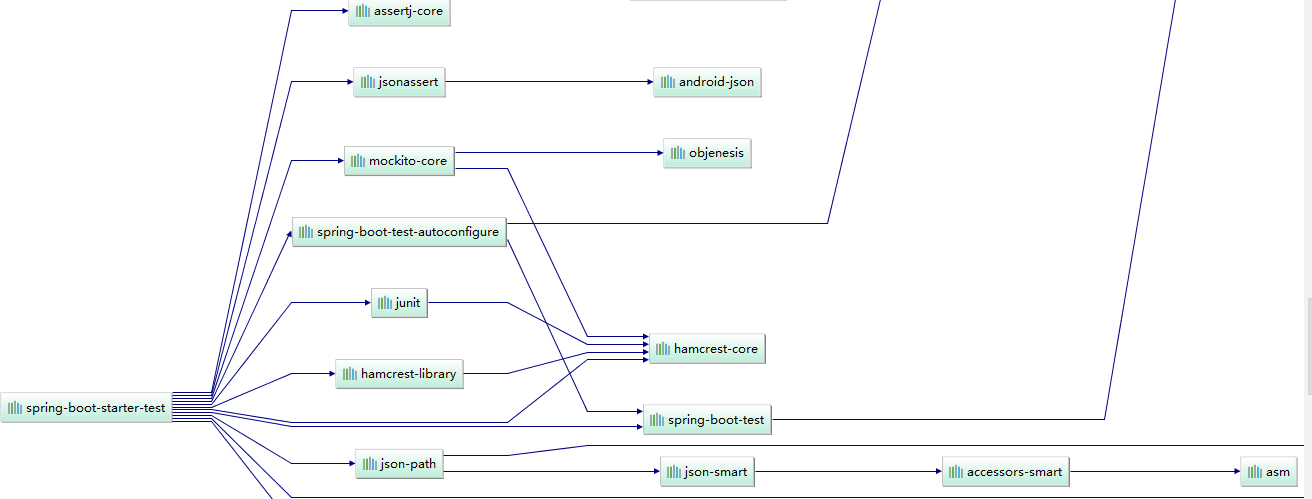
以上是 Spring Boot 默认集成的测试工具。如果你的项目有特殊需求,也可以自由地在测试作用域中添加其他第三方测试库。
如何对 Spring Boot 应用进行测试
第一步:添加 Maven 依赖
在 pom.xml 文件的 <dependencies> 节点中添加以下依赖。
<dependency>
    <groupId>org.springframework.boot</groupId>
    <artifactId>spring-boot-starter-test</artifactId>
    <version>1.5.10.RELEASE</version>
    <scope>test</scope>
</dependency>
第二步:编写测试类
- 在测试类上添加
@SpringBootTest和@RunWith(SpringRunner.class)注解,即可将其标识为一个完整的 Spring Boot 集成测试类。 - 在每个具体的测试方法上使用
@Test注解。
如果需要测试 RESTful API,可以自动注入一个 TestRestTemplate 工具类。
@RunWith(SpringRunner.class)
@SpringBootTest
public class ApplicationTest {

    @Autowired
    private TestRestTemplate testRestTemplate;

    @Test
    public void sampleTest() {
        // 测试逻辑
   }

    }
常见 API 测试示例
- 验证 GET 接口
@Test
public void testGetRequest() throws Exception {
    Map<String, String> params = new HashMap<>();
    params.put("username", "Java");
    // 发起GET请求并断言返回结果
    ActResult result = testRestTemplate.getForObject("/api/user?username={username}", ActResult.class, params);
    Assert.assertEquals(0, result.getCode());
}- 验证 POST 接口(表单)
@Test
public void testPostRequest() throws Exception {
    MultiValueMap<String, String> formData = new LinkedMultiValueMap<>();
    formData.add("username", "Java");
    // 发起POST请求并断言
    ActResult result = testRestTemplate.postForObject("/api/user", formData, ActResult.class);
    Assert.assertEquals(0, result.getCode());
}- 验证文件上传接口
@Test
public void testFileUpload() throws Exception {
    // 准备要上传的文件资源
    Resource fileResource = new FileSystemResource("/tmp/testfile.jar");
    MultiValueMap<String, Object> body = new LinkedMultiValueMap<>();
    body.add("username", "Java");
    body.add("file", fileResource); // 注意参数名需与接口一致
    // 发起文件上传请求
    ActResult result = testRestTemplate.postForObject("/api/upload", body, ActResult.class);
    Assert.assertEquals(0, result.getCode());
}- 验证文件下载接口
@Test
public void testFileDownload() throws Exception {
    // 设置请求头,例如认证信息
    HttpHeaders headers = new HttpHeaders();
    headers.set("Authorization", "Bearer token123");
    HttpEntity<Void> requestEntity = new HttpEntity<>(headers);

    // 发起下载请求,接收字节数组响应
    ResponseEntity<byte[]> response = testRestTemplate.exchange(
            "/api/download/{username}",
            HttpMethod.GET,
            requestEntity,
            byte[].class,
            "admin" // 路径参数
    );

    // 验证响应状态并保存文件
    if (response.getStatusCode() == HttpStatus.OK) {
        Files.write(Paths.get("/tmp/downloaded.jar"), response.getBody());
    }
}本博客所有文章除特别声明外,均采用 CC BY-NC-SA 4.0 许可协议。转载请注明来源 只有那年胜过年年!
评论